
| Information Details | Details |
| Author | Abdul Moeez |
| Reviewed By | Techziano Editorial Team |
| Reading Time | 12 min |
| Price Range | Premium |
| Last Reviewed | July 2026 |
The Short Answer
If you are in a hurry here is our recommendation.
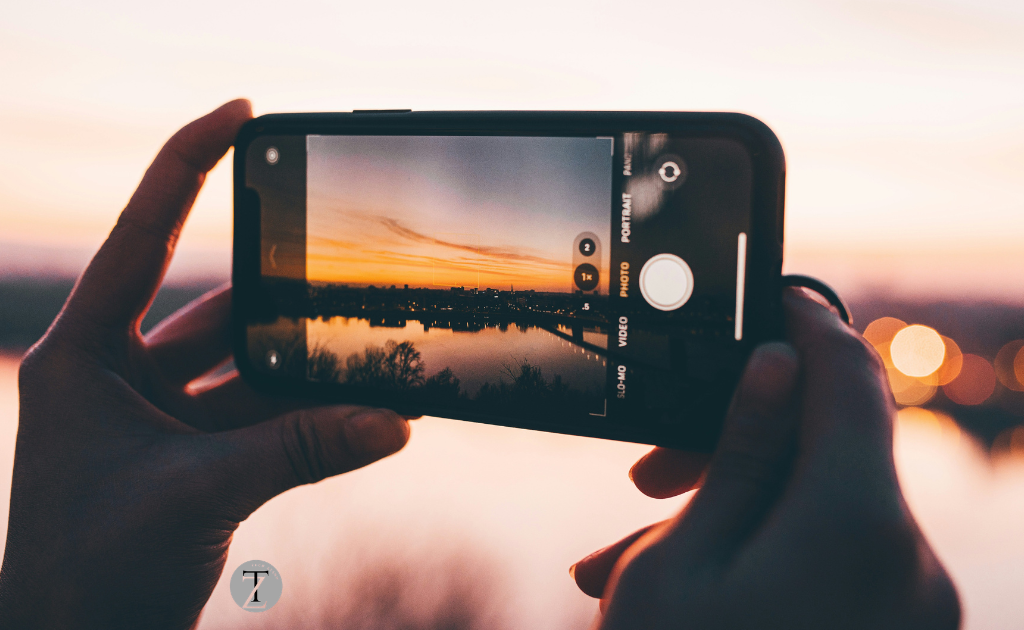
For people, the built-in Camera app on Apples iPhone is already great. However if you want control over your photos and videos a third-party camera app can help you get more from your iPhone. Here is a guide to the best camera app for iPhone.
Why You Can Trust Techziano
Choosing a camera app is not about downloading the popular one. The right camera app depends on how you take photos what you photograph and whether you edit your images.
We compared each camera app based on:
- Ease of use
- Photo quality
- Video capabilities
- Manual camera controls
- RAW support
- Compatibility with iPhones
of recommending the same camera app for everyone we matched each recommendation to a different type of user. From people who take photos for fun to photographers.

How to Use This Guide
Not every reader has the needs. To make choosing easier we identified the camera app for each type of user
| If You Are | We Recommend |
| A beginner | Apple Camera |
| A photographer | Camera+ |
| A professional photographer | Halide |
| A filmmaker | Blackmagic Camera |
| A social media creator | VSCO |
| A photo editor | Adobe Lightroom |
| A photography enthusiast | ProShot |
This way, you can jump straight to the recommendation that fits your photography style.
Quick Comparison
| Camera App | Best For | Free | RAW | Our Rating |
| Halide | Best Overall | No | Yes | Excellent |
| Blackmagic Camera | Video | Yes | Yes | Excellent |
| ProCamera | Professionals | No | Yes | Very Good |
| Camera+ | Everyday Photos | No | Yes | Very Good |
| VSCO | Social Media | Yes | Limited | Very Good |
| Lightroom | Editing | Yes | Yes | Very Good |
| Obscura | Minimalists | No | Yes | Very Good |
| Final Cut Camera | Apple Video Workflow | Yes | Yes | Very Good |
| Fjorden Camera | Creators | No | Yes | Very Good |
| ProShot | Manual Controls | No | Yes | Very Good |
| Apple Camera | Everyday Use | Yes | Pro Models | Very Good |
Before You Spend Money
The editors advice is: do not assume a paid camera app automatically takes better photos. Your iPhones camera hardware stays the same. What changes is the amount of control you have over settings like ISO, shutter speed, focus, exposure and RAW capture. If you are happy with the photos from Apples Camera app you probably do not need to buy another app.
How We Chose the Best Camera App
We focused on the features that actually matter in photography.
- Photo Quality: Can the camera app help you capture sharper images?
- Manual Controls: Does it let you adjust focus ISO, shutter speed and white balance?
- RAW Photography: Can you shoot RAW for greater editing flexibility?
- Video Features: Does it support professional-quality video recording?
- Ease of Use: Can beginners learn it without feeling overwhelmed?
- Value for Money: Do the premium features justify the price?

1. Halide – Best Camera App for iPhone
Overall Rating: 5/5
Best for: photography and people who want to take pictures like they have a big camera and also people who want to shoot in RAW.
Why We Like It
If we had to pick one camera app for people who use iPhones we would pick Halide.
It is really good because it has a lot of features that people who like photography will like. It is also easy to use. Unlike some camera apps that can be hard to understand Halide is simple and easy to use.
What It Is Like To Use It
Imagine you are taking a picture of a sunset.
The camera app that comes with your iPhone might make the picture look too bright. You cannot do much about it.
With Halide, you can make the picture look better by changing the settings like making it less sensitive to light and changing how fast the camera takes the picture and focusing on what you want.
What Makes Halide Special
Most camera apps try to do things.
Halide just tries to make taking pictures
Some things that are good about Halide include:
- You can control everything
- It works with Apple ProRAW
- It helps you focus on what you want
- It shows you a graph that helps you take pictures
- It warns you if the picture is bright
Halide does not try to confuse you with many features it just adds them as you get more comfortable using it.
Choose Halide If
- You take pictures in RAW.
- You like to edit your pictures on your computer.
- You have an iPhone Pro.
Good to Know
Halide will not make your camera better by magic. What it does is give you control over your pictures, which’s good when you get better at taking pictures.
What We Think
Halide is the app we would put on an iPhone that people use for photography. It has a lot of features that people who like photography will like. It is also easy to use. Looks nice.
Rating: 5/5

2. Blackmagic Camera – Best Free Camera App for Video Creators
This is great for YouTubers, filmmakers, vloggers and people who make content.
Real-World Experience
When you are making a video of your trip the light is changing all the time. The Camera app that comes with your phone will keep changing how bright the picture is.
Blackmagic Camera is better because you can set how bright the picture is and the color before you start recording.
Key Features
- Manual video controls
- Zebra exposure warnings
- Histogram
- Professional codecs
- workflow support
Choose Blackmagic Camera If
- You create YouTube videos.
- You record interviews.
- You make travel vlogs.
- You want video controls for free.
Skip Blackmagic Camera If
- You mainly take photos.
- You prefer point-and-shoot apps.
Editors Choice for Video
If you want to make videos then Blackmagic Camera is a choice. It is very good. You do not have to pay for it.

3. ProCamera – Best for Professional Photographers
This is great for YouTubers and filmmakers and vloggers and people who make content.
Why We Picked It
If Halide is good at balancing simplicity and power ProCamera is even better for photography.
It has controls that you can use by hand. It can capture pictures in RAW and TIFF formats. It also has HDR modes. You can take exposure pictures. It has video tools. All in one package.
Real-World Experience
Picture yourself photographing a city skyline after sunset.
Of relying on automatic exposure ProCamera lets you manually adjust shutter speed and ISO to capture cleaner brighter images while preserving details in the lights and shadows.
For photographers who enjoy experimenting this level of control makes a difference.
Key Features
- RAW and TIFF capture
- Manual ISO
- Manual shutter speed
- Manual focus
- White balance control
- HDR mode
- Long-exposure photography
- Professional video recording
Choose ProCamera If
- Photography is your hobby.
- You regularly edit your photos.
- You want manual settings.
Skip ProCamera If
- You’re looking for an app.
- You mainly shoot in Auto mode.
Who Should Buy It?
If you’ve already outgrown the Apple Camera app and want manual control without carrying a dedicated camera ProCamera is an excellent next step.

4. Camera+ – Best for Everyday Photography
for: Everyday users who want better photos without learning professional photography.
Why We Picked It
Not everyone wants to adjust ISO, shutter speed or focus manually.
Sometimes you just want an app that consistently takes photos with minimal effort.
That’s where Camera+ stands out.
It combines automatic shooting with optional manual controls making it ideal for users who want better-looking photos without the complexity of professional camera apps.
If you’re upgrading from Apples Camera app but don’t want a learning curve Camera+ is one of the easiest recommendations.
Real-World Experience
Imagine you’re on vacation and want to capture food, landscapes and family photos.
Of adjusting multiple settings for every shot Camera+ intelligently handles most situations while still letting you take manual control whenever needed.
It feels like an upgraded version of Apples Camera app than a completely different experience.
Why You’ll Like It
- Beginner- interface
- RAW photo capture
- Manual exposure controls
- Built-in photo editing
- Image stabilizer for sharper photos
- Macro photography support
Choose Camera+ If
- You want photos without complexity.
- You mainly shoot while traveling.
- You like editing inside the app.
- You’re moving beyond Apples Camera app.
Skip Camera+ If
- You need video tools.
- You want DSLR-style manual controls.
Our Verdict
If Halide feels too advanced and Apples Camera app feels too limited Camera+ sits perfectly in the middle.
Rating: 4.7/5
5. VSCO – Best Camera App for Instagram & Social Media
Best for: Instagram creators, influencers and users who care about photo aesthetics.
Why We Picked It
Most people know VSCO because of its filters.
Many don’t realize it also includes a capable camera that integrates seamlessly with its editing tools.
Of taking a photo in one app and editing it in another VSCO lets you capture, edit and export everything from one place.
If your photos usually end up on Instagram, Threads, Pinterest or other social platforms VSCO makes the workflow much faster.
Real-World Experience
Suppose you’re visiting a café and want to post a photo within minutes.
You can capture the image apply one of VSCOs signature film-inspired presets make exposure adjustments and upload it without switching between multiple apps.
For creators who value speed that’s an advantage.
Standout Features
- Professional presets
- Built-in camera
- RAW editing
- Video editing
- Exposure adjustments
- Color grading
- Creative community
Choose VSCO If
- You post on Instagram regularly.
- You love film-style filters.
- Editing matters more, than controls.
Skip VSCO If
- You want DSLR- manual photography.
- You mainly shoot video.
Pros of VSCO are
- it has beautiful presets
- excellent editing tools
- it is beginner-
- a free version is available
Cons of VSCO are
- you need a premium subscription to unlock the best filters
- the camera controls are basic
VSCO is not trying to replace Halide or ProCamera. It is designed for people who want share-ready photos with minimal effort.
Our verdict
VSCO remains one of the creative apps for iPhone photographers who prioritize editing and visual style over advanced manual controls.
Rating: (4.6/5)
6. Adobe Lightroom is the camera app for photography and editing.
It is best for photographers who edit every photo before sharing it.
If your workflow always includes editing Adobe Lightroom can save you a lot of time.
By using one app to capture photos and another to edit them Lightroom combines both into a single workflow.
Its camera supports RAW capture while its editing tools are among the available on any mobile platform.
Imagine you are photographing a mountain landscape during sunset.
Even if the original image looks slightly dark Lightrooms RAW editing tools allow you to recover shadow detail improve colors and fine-tune exposure while maintaining image quality.
Standout features of Lightroom are
RAW capture
professional photo editing
AI masking
lens corrections
cloud synchronization
color grading
presets
You should choose Lightroom if
you edit every photo
you already use Adobe products
you shoot RAW regularly
You should skip Lightroom if
you only need a simple camera app
you never edit your photos
Pros
- it has an industry-leading editor
- it has an excellent RAW workflow
- it has cross-device sync
- it has powerful AI tools
Cons
- a premium subscription unlocks advanced features
- the camera interface is not as photography-focused as Halide
- If editing is just as important as taking the photo Lightroom offers the complete workflow.
Our verdict
Lightroom is not one of the best camera apps it is one of the best photography apps available for iPhone.
For creators and professionals who edit regularly it is a recommendation.
Rating: ☆ (4.8/5)
Quick Comparison
| Need | Best Choice |
| Simple everyday photos | Camera+ |
| Instagram content | VSCO |
| Professional editing | Lightroom |
| Manual photography | Halide |
| Professional video | Blackmagic Camera |
7. Obscura is the minimalist camera app.
It is best for photographers who want a distraction-free camera experience.
Why We Picked It
Obscura focuses on one thing making photography enjoyable.
Its interface is beautifully designed, responsive. Gives you quick access to important controls without feeling cluttered.If you appreciate simplicity but still want RAW shooting and manual controls Obscura is a choice.
What Makes It Special
What makes Obscura special is that it keeps the camera interface clean while still offering tools like
- RAW photography
- focus
- histogram
- focus peaking
- gesture controls
You should choose Obscura if
- you like simple interfaces
- you shoot street photography
- you value speed over features
You should skip Obscura if
- you need advanced video tools
- you want built-in editing features
Our verdict
Obscura is proof that a camera app does not need dozens of features to be enjoyable.
If you value simplicity and speed it is one of the designed camera apps for iPhone.
Rating: ☆ (4.5/5)
8. ProShot is the manual camera app for photography enthusiasts.
It is best for users who enjoy learning photography.
Why We Picked It
If your goal is to understand photography not just take pictures ProShot gives you nearly complete control over your camera settings.
It is one of the experiences to using a dedicated camera on an iPhone.
Best features of ProShot
- manual ISO
- manual shutter speed
- manual focus
- white balance
- RAW support
- professional video controls
You should choose ProShot if
- you enjoy manual photography
- you like experimenting with camera settings
You should skip ProShot if
- you only use Auto mode
- you are completely new to photography
Our verdict
ProShot is not the app to learn but it is one of the most rewarding once you understand manual photography.
Rating: ☆ (4.5/5)
9. Apple Camera is still the choice for most people.
Best for users:
Everyday users
Don’t Ignore the Built-in Camera
Before spending money on another app ask yourself one question:
Do you actually need more than the Apple Camera app offers?
For people the answer is no.
Apple has spent years improving its camera software.
Features like Night Mode, Portrait Mode, Smart HDR, Action Mode, Cinematic Mode and Apple ProRAW already produce results on supported devices.
If you mainly take family photos, vacation pictures, food shots or casual videos the built-in Camera app is often all you need.
What Apple Camera does well is
- it is fast and reliable
- it is optimized for iPhone hardware
- it has image processing
- it is free
- it has regular updates with iOS
Where Apple Camera falls short is
- it has no full manual controls
- it has limited control over shutter speed and ISO
- it has less flexibility for advanced photographers
You should choose Apple Camera if
- you mainly shoot in Auto mode
- you do not edit RAW photos
- you want the simplest experience
You should skip Apple Camera if
- you want DSLR-like control
- you shoot professionally
Our advice is to not feel pressured to buy a camera app just because others recommend one.
Apples Camera app is genuinely excellent. For many users it is the smartest choice.

Final ratings are
| Camera App | Rating | Best For |
| Halide | Excellent | Best Overall |
| Blackmagic Camera | Excellent | Best Free Video |
| ProCamera | Very Good | Professionals |
| Lightroom | Very Good | Editing |
| Camera+ | Very Good | Everyday Photography |
| VSCO | Very Good | Social Media |
| Apple Camera | Very Good | Casual Users |
| Final Cut Camera | Very Good | Apple Creators |
| Obscura | Very Good | Minimalists |
| ProShot | Very Good | Manual Photography |
| Fjorden Camera | Very Good | Content Creators |
Free vs paid camera apps: which one offers value?
Many people assume that paying for a camera app automatically results in photos.That is not entirely true.The camera hardware inside your iPhone does not change when you install an app.What changes is the amount of control you have over the camera.
Paid apps become worthwhile when you want features such as
- ISO and shutter speed control
- RAW photography
- advanced focus controls
- professional video tools
- better long-exposure photography
- workflow improvements, for editing
If you are just taking photos for your family. When you travel or for social media you probably do not need to spend money on a camera app. However if photography is something you really enjoy doing or if it is part of your work then investing in an app like Halide or ProCamera can give you greater control over your photos.
Editors Recommendation
If you are buying one app choose Halide. It offers the mix of professional controls and ease of use and it is a good value in the long run. If you do not want to spend money Blackmagic Camera is the free alternative, especially for people who make videos.
Sources
- Apple Support – iPhone Camera User Guide
- Apple Support – Apple ProRAW
- Apple Developer Documentation
- Halide Official Website
- Adobe Lightroom
- Obscura
Related Guides
Continue Reading
Which iPhone has the Best Camera?
Best Microphones for Podcasting
Freqently Ask Questions
What is the best camera app for iPhone?
Halide is our recommendation because it combines professional manual controls and RAW photography and it is easy to use for both people who are just starting out and experienced photographers who use the iPhone.
What is the free camera app for iPhone?
For photography the built-in Camera app from Apple is excellent. For professional-quality video recording Blackmagic Camera is our free pick for the iPhone.
Does a camera app improve photo quality?
A camera app cannot improve the camera hardware in your iPhone. It can give you more control over settings like focus and exposure and ISO and RAW capture. That additional control can help you take photos in the right situations when you use the iPhone.
Is Halide worth paying for?
Yes, if you enjoy photography or if you edit your images or if you want camera controls for your iPhone. Casual users who only shoot in Auto mode may not benefit enough to justify the cost of Halide.
Do I need a paid camera app?
Not necessarily most people will be happy with Apples Camera app on their iPhone. Paid apps are most beneficial for users who want controls or RAW capture or professional workflows for their iPhone.
Which app supports RAW photography?
Halide and ProCamera and Lightroom and ProShot and Obscura and several other apps in this guide support RAW capture on iPhone models.
Final Verdict
The iPhone already has one of the smartphone cameras available but the right camera app can unlock features that Apples default Camera app does not offer for the iPhone.
For photographers who use the iPhone, Halide is the best overall choice because it combines professional tools with an intuitive interface for the iPhone. If video is your priority Blackmagic Camera delivers recording features completely free for the iPhone. Users who edit every image should consider Adobe Lightroom while casual photographers can continue using the Apple Camera app with confidence on their iPhone.

Hi, I am the founder of Techziano and a technology enthusiast passionate about AI, software, web development, cybersecurity, and emerging technologies. I creates practical tutorials, software reviews, and technology insights to help readers stay informed and build valuable digital skills.